 goome
How the ui kit works
Immediate mode, like Dear ImGui but made for overlays first. You keep your own variables and call the widgets every frame.
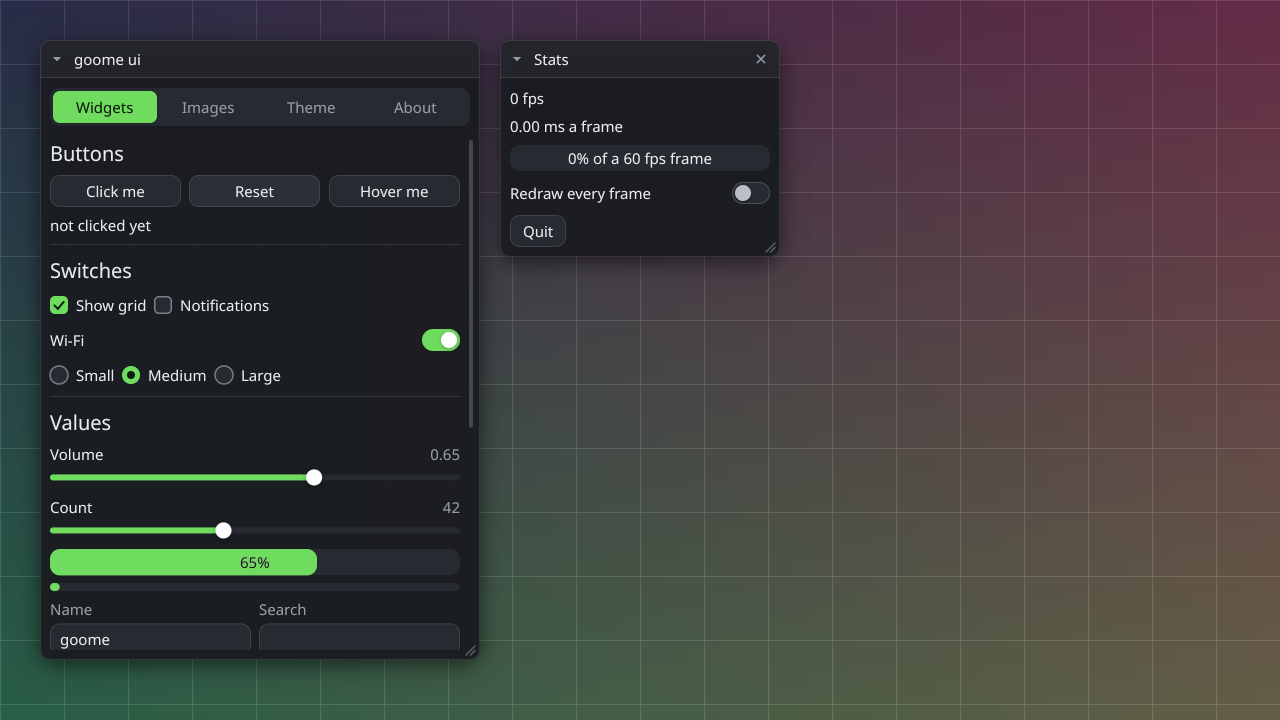
The loop
goome_ui *u = goome_ui_new(g);
double x = 40, y = 40, w = 300, h = 0, volume = 0.5;
int muted = 0, running = 1;

while (running) {
    goome_event ev;
    while (goome_poll(g, &ev, 16) > 0) {
        if (ev.type == GOOME_QUIT) running = 0;
        goome_ui_feed(u, &ev);
    }
    if (!goome_ui_begin(u, 0)) continue;
    if (goome_ui_window(u, "Settings", &x, &y, &w, &h, GOOME_WIN_MOVE | GOOME_WIN_COLLAPSE, NULL)) {
        if (goome_ui_button(u, "Say hi")) puts("hi");
        goome_ui_slider(u, "Volume", &volume, 0, 1, "%.2f");
        goome_ui_toggle(u, "Muted", &muted);
    }
    goome_ui_window_end(u);
    goome_ui_end(u);
}
goome_ui_free(u);
using var ui = new Ui(g);
double x = 40, y = 40, w = 300, h = 0, volume = 0.5;
bool muted = false;

for (bool running = true; running;)
{
    while (g.Poll(out var ev, 16))
    {
        if (ev.Type == EventType.Quit) running = false;
        ui.Feed(ev);
    }
    if (ui.Begin(0) == null) continue;
    if (ui.Window("Settings", ref x, ref y, ref w, ref h, WindowFlags.Move | WindowFlags.Collapse))
    {
        if (ui.Button("Say hi")) Console.WriteLine("hi");
        ui.Slider("Volume", ref volume, 0, 1, "%.2f");
        ui.Toggle("Muted", ref muted);
    }
    ui.WindowEnd();
    ui.End();
}
with g.ui() as ui:
    win = goome.Window(40, 40, 300)
    volume, muted, running = 0.5, False, True
    while running:
        for ev in g.events(16):
            if ev.type == goome.QUIT:
                running = False
            ui.feed(ev)
        with ui.frame(0) as c:
            if c is None:
                continue
            with ui.window("Settings", win, goome.WIN_MOVE | goome.WIN_COLLAPSE) as shown:
                if shown:
                    if ui.button("Say hi"):
                        print("hi")
                    volume = ui.slider("Volume", volume, 0, 1, "%.2f")
                    muted = ui.toggle("Muted", muted)
try (Ui ui = g.ui()) {
    Window win = new Window(40, 40, 300, 0);
    double volume = 0.5;
    boolean muted = false, running = true;
    while (running) {
        for (Event e : g.events(16)) {
            if (e.type() == Goome.QUIT) running = false;
            ui.feed(e);
        }
        if (ui.begin(0) == null) continue;
        if (ui.window("Settings", win, Ui.WIN_MOVE | Ui.WIN_COLLAPSE)) {
            if (ui.button("Say hi")) System.out.println("hi");
            volume = ui.slider("Volume", volume, 0, 1, "%.2f");
            muted = ui.toggle("Muted", muted);
        }
        ui.windowEnd();
        ui.end();
    }
}
let mut ui = goome::Options::new().title("settings").open()?.ui()?;
let mut win = goome::WindowState::new(40.0, 40.0, 300.0, 0.0);
let (mut volume, mut muted, mut running) = (0.5, false, true);
while running {
    for ev in ui.pump(16) {
        if ev.kind == goome::QUIT {
            running = false;
        }
    }
    let Some(mut f) = ui.begin(0) else { continue };
    let mut w = f.window("Settings", &mut win, goome::WIN_MOVE | goome::WIN_COLLAPSE);
    if w.shown() {
        if w.button("Say hi") {
            println!("hi");
        }
        w.slider("Volume", &mut volume, 0.0, 1.0);
        w.toggle("Muted", &mut muted);
    }
}
ui, _ := g.NewUI()
defer ui.Free()
win := goome.NewWindow(40, 40, 300, 0)
volume, muted := 0.5, false
for running := true; running; {
	for ev := range g.Events(16) {
		if ev.Type == goome.EventQuit {
			running = false
		}
		ui.Feed(ev)
	}
	if ui.Begin(0) != nil {
		if ui.Window("Settings", win, goome.WinMove|goome.WinCollapse) {
			if ui.Button("Say hi") {
				fmt.Println("hi")
			}
			ui.SliderFmt("Volume", &volume, 0, 1, "%.2f")
			ui.Toggle("Muted", &muted)
		}
		ui.End()
	}
	ui.End()
}
const ui = try g.ui();
defer ui.deinit();
var win: goome.Window = .{ .x = 40, .y = 40, .w = 300 };
var volume: f64 = 0.5;
var muted = false;
while (true) {
    while (try g.poll(16)) |ev| {
        if (ev.kind == .quit) return;
        _ = ui.feed(ev);
    }
    _ = ui.begin(0) orelse continue;
    if (ui.window("Settings", &win, goome.win.move | goome.win.collapse)) {
        if (ui.button("Say hi")) std.debug.print("hi\n", .{});
        _ = ui.slider("Volume", &volume, 0, 1, "%.2f");
        _ = ui.toggle("Muted", &muted);
    }
    ui.windowEnd();
    ui.end();
}
local ui = g:ui()
local win = {x = 40, y = 40, w = 300, h = 0}
local volume, muted, running = 0.5, false, true
while running do
  for ev in g:events(16) do
    if ev.type == goome.QUIT then running = false end
    ui:feed(ev)
  end
  if ui:begin(0) then
    if ui:window("Settings", win, goome.WIN_MOVE + goome.WIN_COLLAPSE) then
      if ui:button("Say hi") then print("hi") end
      volume = ui:slider("Volume", volume, 0, 1, "%.2f")
      muted = ui:toggle("Muted", muted)
    end
    ui:window_end()
    ui:finish()
  end
end
const ui = g.ui();
const win = { x: 40, y: 40, w: 300 };
let volume = 0.5, muted = false, running = true;
while (running) {
  for (const ev of g.events(16)) {
    if (ev.type === goome.QUIT) running = false;
    ui.feed(ev);
  }
  ui.frame(0, () => {
    ui.window("Settings", win, goome.WIN_MOVE | goome.WIN_COLLAPSE, () => {
      if (ui.button("Say hi")) console.log("hi");
      volume = ui.slider("Volume", volume, 0, 1, "%.2f");
      muted = ui.toggle("Muted", muted);
    });
  });
}
Every frame:
- feed it every event with
goome_ui_feed. It returns 1 when the UI used the event goome_ui_begin(u, mon)starts the frame on a monitor. NULL means skip this frame- call your windows and widgets
goome_ui_end(u)draws it all and sends it, with every window as a hit rect
Values
The slider doesnt own volume, you do. Change it anywhere and the slider shows it next frame. Same with window x, y, w, h, save them and pass them back next run to restore the layout.
Widgets that change something return 1 on the frame they changed it (C#, Rust, Go and Zig return true, Python and Node set ui.changed). Java, Python, Node and Lua widgets give back the new value instead, Java has ui.changed() and Lua gives back if it changed as a second value.
Ids
Widgets keep a bit of state (hover animation, scroll offset, text cursor) by id, and the id is the label. Same label in the same window = shared state.
Anything after ## is part of the id but not shown, so "Save##top" and "Save##bottom" are two buttons that both say Save. In a loop push something unique:
for (int i = 0; i < n; i++) {
    char id[16];
    snprintf(id, sizeof(id), "%d", i);
    goome_ui_push_id(u, id);
    if (goome_ui_button(u, "Delete")) remove_item(i);
    goome_ui_pop_id(u);
}
Drawing less
Only draw after an event or while goome_ui_animating(u) says somethings still moving (a hover fading in, a toggle sliding over, your own animations 0.5). See Frames, damage and pacing.
Widgets
- Windows and layout
- Text and buttons
- Checkboxes and toggles
- Sliders and colors
- Inputs, combos and lists
- Themes
- Themes the simple way 0.3
- Icons and skins 0.3
- App mode and menus 0.2
- Keyboard and focus 0.2
- Tables, trees and editors 0.2
- Plots, drag and more 0.2
- Custom everything 0.3
- Change anything 0.3
- Animations 0.5
- Screen readers 0.5
#define GOOME_NO_UI before the implementation leaves the UI kit out.