 goome
Images and fonts
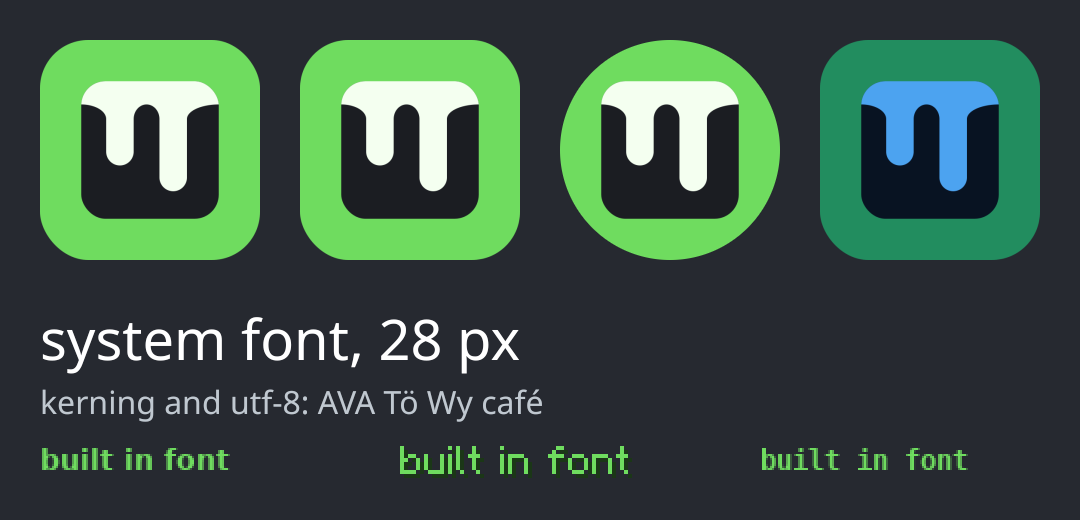
Loading images
goome_bitmap logo;
if (goome_bitmap_load("logo.png", &logo) != GOOME_OK)
    fprintf(stderr, "cant load it: %s\n", goome_bitmap_error());
goome_draw_bitmap(c, &logo, 20, 20, 110, 110, goome_radius(22), 0xFFFFFFFF);
goome_bitmap_free(&logo);
using var logo = Bitmap.Load("logo.png");
c.DrawBitmap(logo, 20, 20, 110, 110, 22);
logo = goome.Bitmap.load("logo.png")
c.bitmap(logo, 20, 20, 110, 110, radius=22)
logo.close()
try (Bitmap logo = Bitmap.load("logo.png")) {
    c.bitmap(logo, 20, 20, 110, 110, 22, 0xFFFFFFFF);
}
Reads PNG (any color type and bit depth, palettes, interlaced), baseline and progressive JPEG, BMP, PPM and QOI. Goes by whats in the file, the extension doesnt matter. Reads are bounds checked, max 16384x16384.
goome_bitmap_load_mem(data, n, &b)loads from memory, for images you bake into your exe.goome_bitmap_from_argb(px, w, h, &b)copies plain ARGB pixels in.- The tint multiplies every pixel,
0xFFFFFFFFleaves it alone. The blue logo in the picture is the same bitmap with a blue tint. goome_draw_bitmap_partdraws a piece of a bitmap, for sprite sheets.goome_draw_bitmap_nine0.2 draws a nine-slice: the corners stay their size and the edges and middle stretch.l,t,r,bmare the border sizes in bitmap px.
Bitmaps are yours to free. Load once, not every frame.
Fonts
goome_font *f = goome_font_system(NULL);
goome_text(c, f, 28, 20, 150, "system font, 28 px", 0xFFFFFFFF);
double w = goome_text_measure(f, 16, "how wide is this", NULL);
goome_font_free(f);
using var f = Font.System()!;
c.DrawText(f, 28, 20, 150, "system font, 28 px", 0xFFFFFFFF);
double w = f.Measure(16, "how wide is this");
f = goome.Font.system()
c.font_text(f, 28, 20, 150, "system font, 28 px", 0xFFFFFFFF)
w, h = f.measure("how wide is this", 16)
try (Font f = Font.system(null)) {
    c.text(f, 28, 20, 150, "system font, 28 px", 0xFFFFFFFF);
    double w = f.width("how wide is this", 16);
}
goome_font_load(path)takes .ttf, .otf and .ttc.goome_font_load_indexpicks a face out of a .ttc.goome_font_system(NULL)finds the desktop’s normal UI font (through fontconfig on Linux if its there, Segoe UI on Windows, SF or Helvetica on Mac). Pass a name to look for that one instead.goome_font_load_mem(data, n, copy)loads from memory. Withcopy0 the data has to stay around as long as the font does.yis the top of the text, not the baseline.goome_text_line_heightgives you the line height for a size.- Kerning and utf-8 work. Glyphs get cached per size.
- NULL font = the built in bitmap fonts, those work with no fonts installed at all.
- Emoji come out in color, missing letters come from fallback fonts, and Arabic and Hebrew go right to left 0.5. Thats on Emoji, fonts and RTL.
The rasterizer is integer only, same pixels on every machine.