 goome
Getting started in C
goome is one header. Drop goome.h in your project and compile the implementation in exactly one .c file. Nothing to link, no include paths.
To start from a project that already builds, goome new my-app --lang c makes one from the C template, see Templates and goome new 0.4.
Pick what you are making
Overlay on top of everything
The default. A see-through layer over every monitor, only what you mark as clickable takes clicks. Overlay mode
#include "goome.h"

int main(void)
{
    goome *g = goome_open(&(goome_opts){.title = "my overlay"}, NULL);
    if (!g) return 1;
    for (;;) {
        goome_event ev;
        while (goome_poll(g, &ev, 16) > 0)
            if (ev.type == GOOME_QUIT) return 0;
        goome_canvas *c = goome_begin(g, 0);
        if (!c) continue;
        goome_draw_round_rect(c, 40, 40, 240, 50, 12, 0xE0202838);
        goome_draw_text(c, 56, 56, "on top of everything", 0, 0xFFFFFFFF);
        goome_end(g, c, NULL, 0);
    }
}
Make a normal app 0.2
goome_open_app is goome_open in window mode, resizable and centered. You get a real window with a title bar and the UI kit fills it. Window mode
#include "goome.h"

int main(void)
{
    goome *g = goome_open_app("My app", 960, 640, NULL);
    if (!g) return 1;
    goome_ui *u = goome_ui_new(g);
    int running = 1, clicks = 0;
    while (running) {
        goome_event ev;
        while (goome_poll(g, &ev, 16) > 0) {
            if (ev.type == GOOME_CLOSE || ev.type == GOOME_QUIT) running = 0;
            goome_ui_feed(u, &ev);
        }
        if (!goome_ui_begin(u, 0)) continue;
        if (goome_ui_app(u, "My app", 0)) {
            if (goome_ui_button(u, "Click me")) clicks++;
            goome_ui_label(u, "clicked %d times", clicks);
        }
        goome_ui_app_end(u);
        goome_ui_end(u);
    }
    goome_ui_free(u);
    goome_close(g);
    return 0;
}
Inside Unity or a game engine 0.2
No OS window. goome draws into a buffer, your engine shows it as a texture and feeds it input. This one just renders one frame to a file. See Offscreen mode and Getting started in Unity.
#include "goome.h"

int main(void)
{
    goome *g = goome_open(&(goome_opts){.mode = GOOME_MODE_OFFSCREEN, .width = 320, .height = 200}, NULL);
    if (!g) return 1;
    goome_canvas *c = goome_begin(g, 0);
    goome_draw_round_rect(c, 20, 20, 280, 160, 16, 0xFF6FDC5F);
    goome_end(g, c, NULL, 0);
    goome_image img;
    if (goome_frame(g, &img) == GOOME_OK) goome_save_ppm("frame.ppm", img.px, img.w, img.h, img.stride);
    goome_close(g);
    return 0;
}
Get goome.h
Linux or Mac, in your project folder:
curl -fsSL https://raw.githubusercontent.com/goome-ui/c-goome/main/get.sh | sh
Windows, in PowerShell (not cmd):
irm https://raw.githubusercontent.com/goome-ui/c-goome/main/get.ps1 | iex
It grabs goome.h and hello.c, makes a goome.c and tries to build hello. An existing goome.h gets moved to goome.h.old first, so run it again to update.
Or just download goome.h, thats the whole library.
For one exact version instead of the newest, see Versions.
The implementation file
In one .c file (the script makes it as goome.c):
#define GOOME_IMPLEMENTATION
#include "goome.h"
Everywhere else just #include "goome.h". Has to be .c, not .cpp. Including the header from C++ is fine though.
Your first overlay
A box on monitor 0 that prints every click on it. Clicks anywhere else go to the app under it.
#include <stdio.h>
#include "goome.h"

int main(void)
{
    goome *g = goome_open(&(goome_opts){.title = "my overlay"}, NULL);
    if (!g) return 1;

    goome_pacer pace = {0};
    for (;;) {
        goome_event ev;
        int wait = goome_pace(&pace, 60);
        while (goome_poll(g, &ev, wait) > 0) {
            if (ev.type == GOOME_QUIT) return 0;
            if (ev.type == GOOME_DOWN) printf("clicked at %.0f,%.0f\n", ev.x, ev.y);
            wait = goome_pace(&pace, 60);
        }

        goome_canvas *c = goome_begin(g, 0);
        if (!c) continue;
        goome_draw_round_rect(c, 100, 100, 200, 80, 12, 0xE0202838);
        goome_draw_text(c, 116, 128, "click me", 1, 0xFFFFFFFF);
        goome_rect hit = {100, 100, 200, 80};
        goome_end(g, c, &hit, 1);
    }
}
Build:
cc -O2 -o myapp myapp.c goome.c
Visual Studio’s compiler: cl /O2 myapp.c goome.c. mingw is the same gcc line.
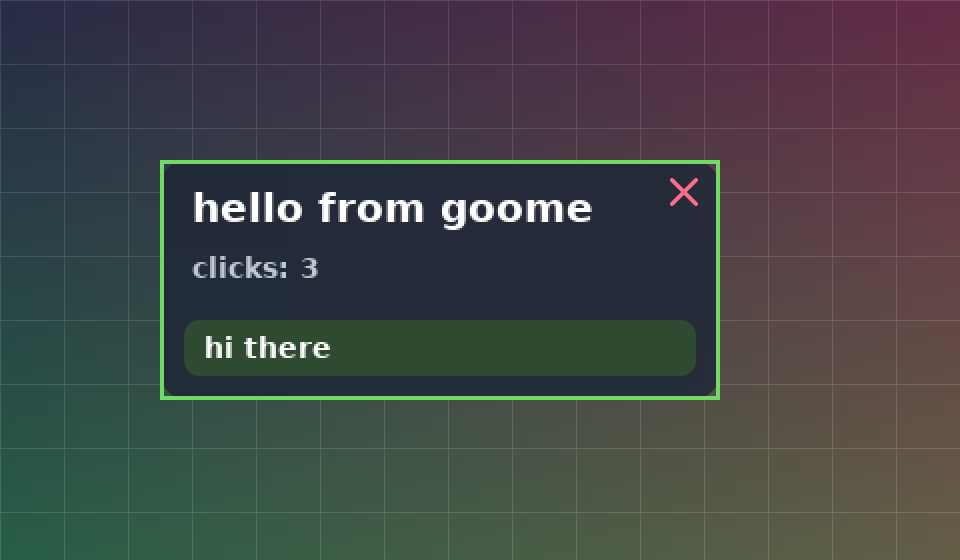
Thats examples/hello.c from c-goome, which also has a close button, a hotkey and typing. Rendered on the test backend.