 goome
OBS plugin 0.5
obs-goome adds a goome overlay source to OBS Studio. It draws goome straight into your scene: a timer, now playing, a goal bar, a clock, a ticker or chat, or any UI you made in the builder. Right click it and hit Interact and the buttons, toggles and sliders work live, even while you stream.
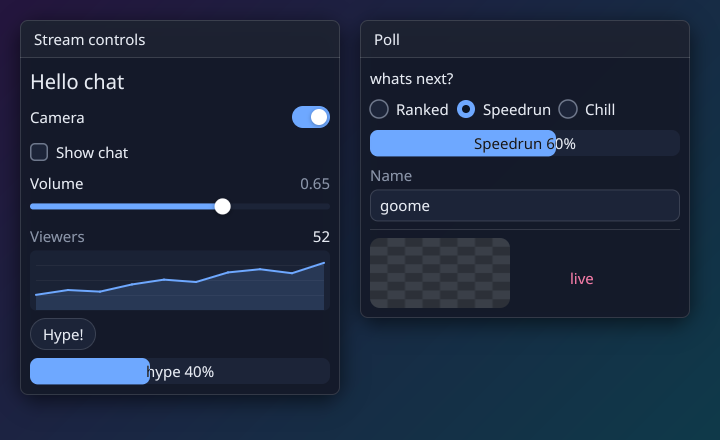
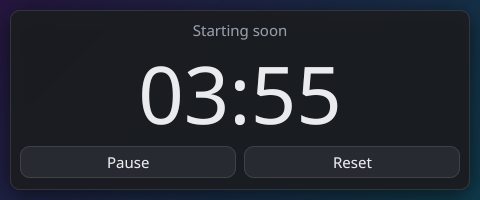
Every picture here is a real frame from the plugin, the tests made them.
Install
Needs OBS Studio 31 or newer. Close OBS first. The files are on the latest release.
Windows
Download obs-goome-…-windows-x64-installer.exe 0.5.1 and run it. It installs to C:\ProgramData\obs-studio\plugins\obs-goome, the folder OBS looks in for plugins, and uninstalls from Settings > Apps. Its not signed, so if SmartScreen stops it click More info, then Run anyway.
Or without the installer, download obs-goome-…-windows-x64.zip and unzip it into C:\ProgramData\obs-studio\plugins, so you end up with:
C:\ProgramData\obs-studio\plugins\obs-goome\bin\64bit\obs-goome.dll
Make the folder if its not there yet, thats where OBS looks for plugins.
Mac
Download obs-goome-…-macos-universal.pkg and open it, it puts the plugin in the right spot. Its not signed yet, so if macOS blocks it right click it, pick Open, then Open again. Apple Silicon and Intel both work.
Linux
On Ubuntu / Debian:
sudo apt install ./obs-goome-*-x86_64-linux-gnu.deb
Its built against the OBS from the OBS PPA, so it wants that OBS or a newer one. On other distros pull the files out of the .deb:
mkdir deb && dpkg-deb -x obs-goome-*-x86_64-linux-gnu.deb deb
mkdir -p ~/.config/obs-studio/plugins/obs-goome/bin/64bit ~/.config/obs-studio/plugins/obs-goome/data
cp deb/usr/lib/*/obs-plugins/obs-goome.so ~/.config/obs-studio/plugins/obs-goome/bin/64bit/
cp -r deb/usr/share/obs/obs-plugins/obs-goome/* ~/.config/obs-studio/plugins/obs-goome/data/
The Flatpak OBS cant load plugins from outside the flatpak, so it wont show up there.
After that open OBS, add a source and pick goome overlay.
The built in widgets
Show at the top of the source settings picks what it draws. Every one of them has a theme, an accent color, a UI scale, a font and the card behind it.
| Widget | Settings |
|---|---|
| Timer | counts down or up, minutes / seconds, a label like “Starting soon”, text for when it hits 0, Start / Pause and Reset (on stream, and in the settings so it works without Interact) |
| Now Playing | a text file your music app or Tuna / Snip writes, first line the song, second the artist. Checked every second, long names scroll |
| Goal Bar | a label, and the numbers from the settings or a file (120, or 120/500 to set the goal too). Slides to the new value |
| Clock | 24 hour, seconds, the date, a label. Your computers time zone |
| Ticker / Chat | a text file, newest line at the bottom. One scrolling line, or chat lines stacked from the bottom with name: message names in the accent color. Only reads the end of the file, so a huge log is fine |
Your own UI from the builder
- Make it in the builder and hit Save project (.goome.json) in the Project menu
- In the source settings set Show to A builder file and pick that file
- Leave Theme on From the builder file to keep your theme, or pick a preset to swap it
Save from the builder again and the source reloads by itself, no need to touch OBS. Window spots in the builder are pixels from the top left of the source.
The plugin reads the json in C and turns it into goome ui calls, it doesnt run generated code. It does:
- Layout - windows, rows, same line, space, separators, scroll areas, tabs, collapsing, tree nodes
- Text - labels, headings and wrapped text,
{var}in them gets filled in live - Input - buttons, checkboxes, toggles, radios, sliders, inputs, combos, lists, color pickers
- Data - progress bars, tables, plots, images
- Menus - menu bars, menus, popups, modals
- Looks - the project theme, presets, per widget style overrides
- Logic - project vars and the click / change / on / off / hover actions (set, flip, add, take, open, close, toast, switch tab, copy)
Not yet: custom elements, split panes, the text editor, skin and icon images, hotkeys and the ui config. Those get skipped and the OBS log says how many.
The builder doesnt save pixels for images, so they draw as a checker box. Add "file": "logo.png" (next to the json) or a data: url as "img" on the widget in the json and it draws that.
Interact
Right click the source, in the scene or the sources list, and pick Interact. OBS opens a window with the source in it, and clicks, mouse moves, scrolling and your keyboard go straight to goome. So the buttons, toggles, sliders and inputs all work and the change shows up on stream right away.
OBS doesnt let a source change the mouse cursor, so it stays an arrow over inputs.
Themes
Theme has every goome preset: goome dark, goome light, Midnight, Paper, Mint, High contrast and Rose. Use my own accent color swaps just the accent, UI scale makes it bigger or smaller, Font takes a system font name, a path to a .ttf, or builtin. Turn off Draw the card behind it and only the text and widgets show, right on top of your scene.
Building it
It uses the obs-plugintemplate layout. On Linux you need OBS and its headers (the OBS PPA or libobs-dev) plus libsimde-dev, on Windows and Mac the scripts fetch everything:
cmake --preset ubuntu-x86_64
cmake --build --preset ubuntu-x86_64
tests/run.sh check runs the real source against a fake libobs and checks every frame against pixel hashes. CI also loads the real plugin into libobs under Xvfb, clicks Start on the timer and checks the frame changed.