 goome
Shapes and clipping
You dont have to use this, writing pixels into c->px and calling goome_damage works fine. Shapes are anti-aliased, no libm or any other library, same pixels on every OS.
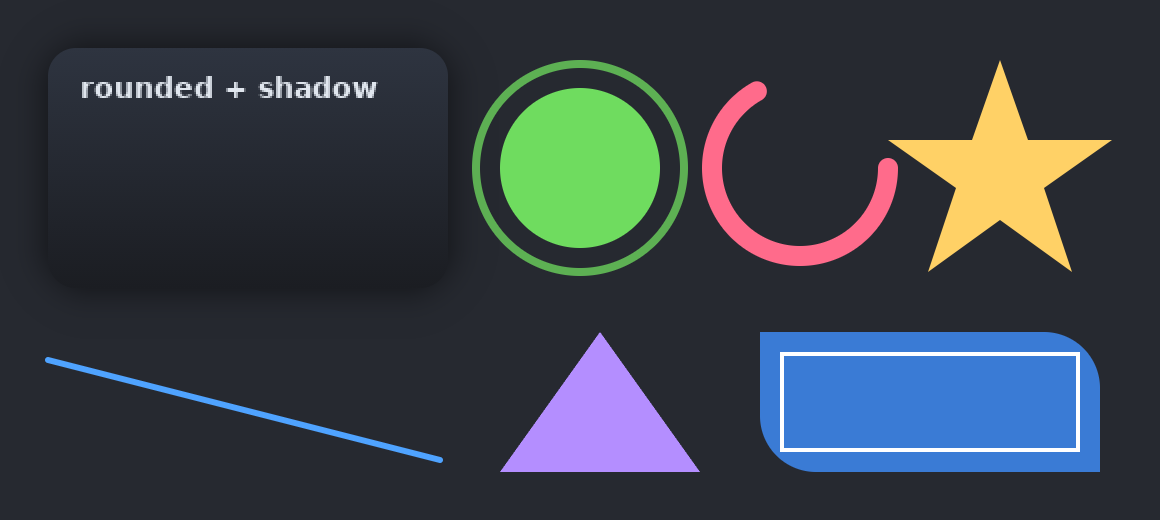
Coords are logical. Colors are plain 0xAARRGGBB, goome premultiplies them itself.
Shapes
goome_draw_rect(c, x, y, w, h, 0xFF2E3440);
goome_draw_round_rect(c, x, y, w, h, 12, 0xE0202838);
goome_draw_frame(c, x, y, w, h, 2, 0xFF6FDC5F);
goome_draw_line(c, 24, 180, 220, 230, 3, 0xFF4FA3FF);
goome_draw_triangle(c, 250, 236, 300, 166, 350, 236, 0xFFB48EFF);
goome_draw_circle(c, 290, 84, 40, 0xFF6FDC5F);
goome_draw_ring(c, 290, 84, 52, 4, 0xC06FDC5F);
goome_draw_arc(c, 400, 84, 44, 10, 0, 4.2, 0xFFFF6B8B);
c.DrawRect(x, y, w, h, 0xFF2E3440);
c.DrawRoundRect(x, y, w, h, 12, 0xE0202838);
c.DrawFrame(x, y, w, h, 2, 0xFF6FDC5F);
c.DrawLine(24, 180, 220, 230, 3, 0xFF4FA3FF);
c.DrawTriangle(250, 236, 300, 166, 350, 236, 0xFFB48EFF);
c.DrawCircle(290, 84, 40, 0xFF6FDC5F);
c.DrawRing(290, 84, 52, 4, 0xC06FDC5F);
c.DrawArc(400, 84, 44, 10, 0, 4.2, 0xFFFF6B8B);
c.rect(x, y, w, h, 0xFF2E3440)
c.round_rect(x, y, w, h, 12, 0xE0202838)
c.frame(x, y, w, h, 2, 0xFF6FDC5F)
c.line(24, 180, 220, 230, 3, 0xFF4FA3FF)
c.triangle(250, 236, 300, 166, 350, 236, 0xFFB48EFF)
c.circle(290, 84, 40, 0xFF6FDC5F)
c.ring(290, 84, 52, 4, 0xC06FDC5F)
c.arc(400, 84, 44, 10, 0, 4.2, 0xFFFF6B8B)
c.rect(x, y, w, h, 0xFF2E3440);
c.roundRect(x, y, w, h, 12, 0xE0202838);
c.frame(x, y, w, h, 2, 0xFF6FDC5F);
c.line(24, 180, 220, 230, 3, 0xFF4FA3FF);
c.triangle(250, 236, 300, 166, 350, 236, 0xFFB48EFF);
c.circle(290, 84, 40, 0xFF6FDC5F);
c.ring(290, 84, 52, 4, 0xC06FDC5F);
c.arc(400, 84, 44, 10, 0, 4.2, 0xFFFF6B8B);
goome_draw_ringtakesras the middle of the stroke.goome_draw_arcangles are radians, 0 is 3 oclock and it goes clockwise, with round caps.goome_draw_poly(c, xy, n, argb)fills a polygon fromnx,y pairs with the nonzero rule. The star in the picture is one.
Rounded rects, gradients and shadows
goome_radii gives every corner its own radius (top left, top right, bottom right, bottom left). goome_radius(r) makes all four the same.
goome_draw_shadow(c, 24, 24, 200, 120, 14, 18, 0x90000000);
goome_draw_rrect_grad(c, 24, 24, 200, 120, goome_radius(14), 0xFF2E3440, 0xFF1B1D22, 0);
goome_draw_rrect(c, 380, 166, 170, 70, (goome_radii){0, 28, 0, 28}, 0xFF3A7BD5);
goome_draw_rrect_line(c, 380, 166, 170, 70, goome_radius(8), 2, 0xFFFFFFFF);
c.DrawShadow(24, 24, 200, 120, 14, 18, 0x90000000);
c.DrawRRectGrad(24, 24, 200, 120, 14, 0xFF2E3440, 0xFF1B1D22);
c.DrawRRect(380, 166, 170, 70, new Radii(0, 28, 0, 28), 0xFF3A7BD5);
c.DrawRRectLine(380, 166, 170, 70, 8, 2, 0xFFFFFFFF);
c.shadow(24, 24, 200, 120, 14, 18, 0x90000000)
c.rrect_grad(24, 24, 200, 120, 14, 0xFF2E3440, 0xFF1B1D22)
c.rrect(380, 166, 170, 70, (0, 28, 0, 28), 0xFF3A7BD5)
c.rrect_line(380, 166, 170, 70, 8, 2, 0xFFFFFFFF)
c.shadow(24, 24, 200, 120, 14, 18, 0x90000000);
c.rrectGrad(24, 24, 200, 120, 14, 0xFF2E3440, 0xFF1B1D22);
c.rrect(380, 166, 170, 70, new Radii(0, 28, 0, 28), 0xFF3A7BD5);
c.rrectLine(380, 166, 170, 70, 8, 2, 0xFFFFFFFF);
Gradients go top to bottom, last arg 1 makes it left to right. Shadows are like css box-shadow (rect, corner radius, blur). Draw the shadow first.
Clipping
goome_clip_push(c, 20, 15, 80, 50);
goome_draw_circle(c, 60, 40, 50, 0xFF6FDC5F);
goome_clip_pop(c);
Nothing between push and pop draws outside the rect, text too. Snaps to whole pixels, 16 deep, and each push gets cut to the one before it. goome_begin resets it.
In Java try (var clip = c.clip(20, 15, 80, 50)) { ... } pops it for you.
Text with the built in font
double w = goome_draw_text(c, 20, 20, "hello", 1, 0xFFFFFFFF);
Last int is big (1) or small (0). Returns the width it drew. Java has it as a boolean at the end, c.text(20, 20, "hello", 0xFFFFFFFF, true).
6 built in bitmap fonts, switch with goome_set_font(i), goome_font_count() says how many. Real fonts are on Images and fonts.
Erasing and blitting
goome_erase(c, x, y, w, h) punches a fully see-through hole. goome_canvas_blit(dst, src, alpha, dx, dy) draws one canvas onto another. To cache something slow draw it once into your own canvas and blit that every frame.
Leaving it out
#define GOOME_NO_DRAW before the implementation drops the drawing layer, images, fonts and the UI kit. You still get the overlay, events, hotkeys and capture.